Upload scanned documents, photos of whiteboard brainstorms, meeting slides, or receipts. Intexting extracts clean text and immediately converts notes into structured reports.
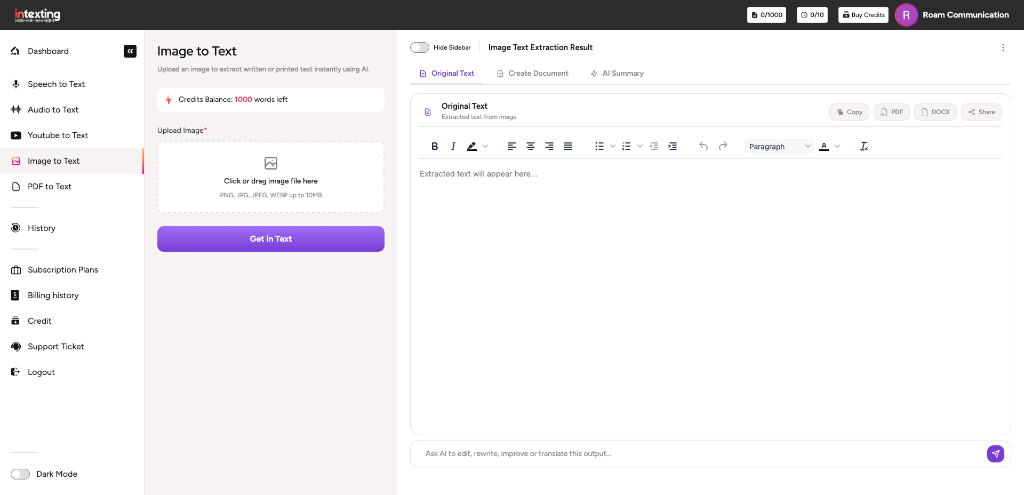
Digitize documents, recognize handwriting, translate into 24+ languages, rewrite with AI, and export seamlessly.
Extracts printed text, tabular data, and fine print from contracts, invoices, legal notices, and book pages with high optical character accuracy.
Native Devanagari OCR for Marathi (मराठी) and Hindi (हिन्दी), with automated translation into English, Tamil, Telugu, and 20+ regional Indian and global languages.
Photograph meeting room whiteboards, brainstorm sticky notes, or handwritten journal entries and receive clean, typed, structured text.
Download your extracted text and structured synthesis in Microsoft Word (.docx), formatted PDF with headers, or Excel (.xlsx) spreadsheets.
Generate a secure tokenized public URL allowing clients or team members to view the original source image and extracted text side-by-side.
Prompt the built-in AI assistant to correct scan artifacts, rephrase rough notes, organize lists, or translate extracted text into formal language.
Extract key decisions, commercial terms, or bulleted executive takeaways from multi-image document sets with one click.
Convert whiteboard notes or paper forms directly into formal Minutes of Meeting, Client Notes, or Legal Case Briefs without typing.
See how Intexting is purpose-built for offline meetings, in-person discussions, and formal executive documentation compared to generic transcription bots.
| Capability & Feature | Intexting Best Choice | Otter.ai | Notta.ai | Sonix.ai |
|---|---|---|---|---|
| Primary Focus | Offline & In-Person Meetings + Document Synthesis | Virtual Meeting Bots (Zoom/Teams/Meet) | Virtual Bot & Quick Voice Notes | Media & Subtitle File Transcription |
| Executive Documentation | Full MoM, Executive Summary, School Notes, Legal & Field Reports | Generic summary & raw bullet points | Basic action points & brief summary | Raw timestamped transcript only |
| Offline & In-Person Meeting Recording | Direct room recording with voice isolation (No bot intrusion) | Mobile app (primarily built for virtual meeting bots) | Mobile & web mic recording | No live recording (pre-recorded upload only) |
| Multi-Modal Input Sources | Audio, Video, YouTube URLs, Image OCR & PDF | Audio & Video files only (no OCR or YouTube) | Audio, Video & YouTube (no OCR) | Audio & Video files only |
| Speaker Diarization & Custom Names | Multi-speaker detection + Custom label renaming | Yes | Yes | Yes |
| Multi-Language Intelligence | 24+ Languages with Auto-Translation | English only (very limited other languages) | 58 Languages | 38+ Languages |
| Zero-Login Client Sharing | Instant public link (zero signup needed for clients) | Requires recipient account | Requires login for full view | View-only link (restricted on basic plans) |
| Export Options | PDF, Word (DOCX), Excel (XLSX), SRT & Markdown | TXT, PDF, DOCX (restricted on free tier) | TXT, DOCX, PDF, XLSX, SRT | PDF, DOCX, TXT, SRT, VTT |
| Pricing & Value | Free tier · Plans from ₹399/mo (~$4.80) | $16.99 / user / month | $13.99 / user / month | $10.00 / hour or $22/mo |
Why prompting a free conversational AI chatbot cannot replace a dedicated end-to-end meeting recording and executive document synthesis platform.
| Capability & Workflow | Intexting Built for Meetings | ChatGPT (OpenAI) | Google Gemini | Claude (Anthropic) |
|---|---|---|---|---|
| Primary Workflow | Dedicated Offline & In-Person Meeting Documentation | Conversational chatbot & general text assistance | Conversational chatbot & web search integration | Conversational assistant & long-form writing |
| In-Person Audio Recording | Direct mobile/web mic with acoustic echo cancellation | No meeting recorder (voice mode is 1-on-1 chat only) | No meeting recorder (voice input only for search/prompting) | No audio or voice recording feature |
| Continuous Meeting Audio Length | Full 1–3 hour continuous meetings without truncation | Strict 25MB file upload limit (~15-20 min audio) | File limits apply; often hallucinates long spoken audios | Cannot transcribe raw audio files directly |
| Speaker Diarization (Who Said What) | Auto-detects multiple speakers with custom name editing | No speaker separation (treats audio as single speaker blob) | Unreliable speaker attribution; frequent misattribution | N/A (requires external transcript first) |
| Sentence Timestamps & Audio Player Sync | Clickable timestamps synchronized directly with audio waveform | No timestamp sync or interactive audio playback | No interactive audio waveform or timestamp player | No audio player integration |
| Automated Executive Templates | Formal MoM, Executive Summary, Cornell Notes & Legal Reports | Requires manual complex prompt engineering every time | Inconsistent formatting; conversational outputs | Good reasoning but requires manual prompt structuring |
| One-Click Native Export | Formatted PDF, Word (.docx), Excel (.xlsx) & SRT Captions | Copy-paste plain markdown chat text only | Export to Google Docs (raw text unformatted) | Copy-paste plain markdown text only |
| Zero-Login Client Sharing | Instant public link (recipients view without an account) | Shared chat links require ChatGPT login for full view | Public chat sharing requires Google account | Shared artifacts require Claude account |
| Data Privacy & Confidentiality | Confidential meeting encryption; your voice never trains public AI | Free tier conversations train OpenAI models by default | Chats may be reviewed by human annotators by default | Free tier prompts may be used for model training |
Everything you need to know about photo OCR, handwriting recognition, regional languages, and file formats.
Intexting supports PNG, JPG, JPEG, WEBP, and TIFF files up to 25MB. For best OCR accuracy, high-resolution smartphone camera captures or flatbed scans (300 DPI or higher) work best.
Yes. Our neural vision model recognizes legible handwriting from meeting journals, whiteboard brainstorm sessions, sticky notes, and printed forms, formatting them into clear paragraphs and bullet lists.
Yes. Intexting provides native OCR models trained on Devanagari script (Marathi, Hindi) alongside English and other major international languages, properly handling complex conjuncts and diacritics.
Our image pre-processing engine automatically detects orientation, corrects perspective skew, and neutralizes shadows or low-contrast glare before performing character recognition.
Yes. Extracted text can be copied to your clipboard with one click or exported as an editable Microsoft Word (.docx) document, searchable PDF, or formatted Minutes of Meeting.
Record conversations on the move, scan whiteboard notes, and generate finished executive Minutes of Meeting in seconds. Seamlessly synced across your phone and web dashboard.